
99Exch APK — Load the Official Android Build Into Your Hangar and Launch It Free
Get the 99Exch APK from one place only: the official 99Exch login portal, where the free Android file sits next to the browser sign-in. You install it yourself once Android agrees to trust your browser, then log in with the ID you already have. Covered below: the download, the permission screen, refreshing a stale build, and what to do when the installer says no.

99Exch APK Payload Bay — Grab the Official Android File
Fetch the 99Exch APK, then sign in inside the appNothing typed here is sent anywhere; the real sign-in and the APK file open on the 99Exch portal. Help on WhatsApp: +91 81097 11726. Adults 18+ only.
Where the Official 99Exch APK Comes From — One Trusted Source
Every copy of the 99Exch APK that this site points to starts on the same login portal that runs the browser version, 99exchlogin.com.in, and no button, card or QR code on this page sends you anywhere else for the file.
Not the Play Store. Type the brand into Google and a third-party store listing called MY 99 EXCH does appear; we do not link to it, and we have no way to tell you who publishes it or what it does with a username and password. The 99Exch portal file is the one the steps below were written around. Same story for searches like "old version" or a so-called black APK: those are files nobody here can vouch for, so they get no space on this page.
Why is it missing from Google's store? The portal does not say. What matters in practice is the result on your phone, because Android treats anything installed from outside the store as coming from an unknown source and stops to ask before it lets the 99Exch app in.
Think of it as a hand-delivered crate rather than a store delivery: the 99Exch file lands in Downloads and opening it is your job. Android checks with you once about the browser that carried it in.
The official 99Exch portal file
Downloaded from the same address you log in on. One account, one source, no middleman.
Store lookalikes, not the verified 99Exch build
A listing with a similar name in a third-party store. Not linked from here, not tested by us.
One quick way to keep this straight on your own phone: check the address bar before you tap the download. If it reads 99exchlogin.com.in, or a 99Exch mirror you reached from it, the file is the right one. Anything else, a short link from a chat group or a file forwarded as an attachment, and you are trusting whoever sent it instead of the 99Exch portal.
99exch App Download APK, Step by Step on Android — Quick Install
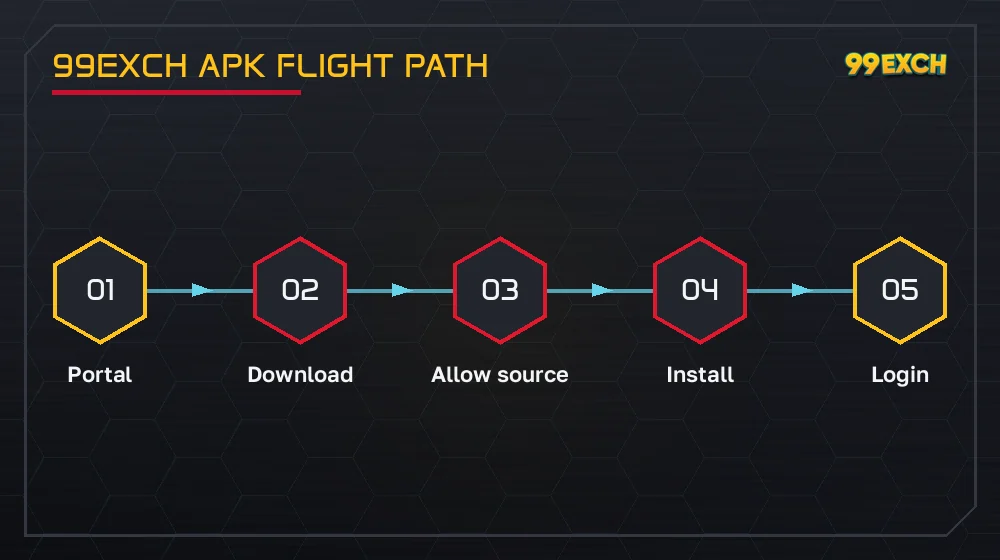
Here is the full 99exch app download apk run on a typical Android phone, from an empty Downloads folder to the 99Exch login screen inside the app. Not long at all. The wording on your screen can differ a little between Samsung, Xiaomi, Vivo, Realme and plain Android, but the order of the screens stays the same, so if a label does not match exactly, look for the one that does the same job.
- Open Chrome, or whichever browser you normally use, and go to 99exchlogin.com.in. If the address refuses to load, a blocked domain is the likely reason; a working 99Exch mirror carries the same ID and the same balance.
- On the portal, tap the Android app download. The label on that link can change over time, so pick the one that mentions Android or the APK rather than the sign-in form.
- Chrome may warn that this type of file can harm your device. That warning appears for every APK; tap Download anyway if the file came from the 99Exch portal address you typed yourself.
- Find the finished 99Exch file. The download notification opens it directly; swiped that away already? The Files app lists it under Downloads, newest first.
- Android pauses the 99Exch installer with a notice about unknown apps. Its Settings shortcut leads to a single switch for your browser; turn it on, come back, and the installer picks up the same file.
- Tap Install. Wait for the App installed message, then tap Open.
- Sign in with the username and password you already use in the browser. The real 99Exch login form has a captcha check, so fill that in as well.
Stuck at step 5 with no Settings button on the prompt? The switch lives in your phone setings instead, and the next section lists where each browser keeps it. If the 99Exch install fails at step 6, skip ahead to the error table.
The Install Unknown Apps Toggle — Safe, Clear Steps for the 99Exch APK
Android stopped using one global "unknown sources" switch years ago. Since Android 8, permission is handed out app by app, which means the browser you used to fetch the 99Exch APK is the app that needs the toggle, not the 99Exch file itself. Chrome downloads, Chrome needs it. Downloaded in Samsung Internet? Then Samsung Internet needs it. Opened the file from a file manager instead of the notification? That file manager needs it.
Short version: whoever opens the file asks.
- Chrome
- The screen is titled Install unknown apps, shows Chrome at the top and offers one switch labelled Allow from this source. Flip it, press back once, and the 99Exch installer is waiting where you left it.
- Samsung Internet
- Galaxy phones word the notice a little differently, but the switch is the same idea. Dismissed it by accident? On One UI it also hides under Security and privacy, inside the special access list.
- Firefox
- Firefox users get the identical permission page with Firefox named on it instead of Chrome.
- Files app or My Files
- Needed only when you open the 99Exch APK from the file manager. The prompt names that app, so allow the one it names.
- Older phones, Android 7 and below
- One switch for the whole phone: Settings, then Security, then Unknown sources.

Xiaomi, Redmi and Poco phones can add one more screen: a scan of the 99Exch file before the installer opens, sometimes with a short wait before the continue option turns on. Let the scan finish. It is the phone maker's check, not something the 99Exch portal controls, and it tends to appear only on the first install from a given browser.
99exch App Download APK Latest Version — Fast Updates Over the Old Build
No build number appears anwhere on this page, and no file size either. The 99Exch portal publishes neither, so whatever file it serves on the day you download is the current one.
Two things usually send people looking for the 99exch app download apk latest version, or its shorter cousin 99exch download apk latest version: an app that has begun acting up, or word from a friend that a newer build exists. The cure is the download you already did once. Your account was never on the phone to begin with; username, password and balance belong to the 99Exch ID that the portal holds, so swapping the app, or deleting it for a week, leaves the account exactly where it was.
Fresh 99Exch install on a clean phone
- Download the file from the 99Exch portal.
- Allow your browser to install unknown apps.
- Tap Install, then Open.
- Sign in with your existing ID.
Quick 99Exch update over an old build
- Download the current file from the same portal.
- Open it; Android asks whether to update the existing app.
- Tap Update. Your sign-in may survive; if not, just log in again.
- If Android says App not installed, uninstall the old 99Exch app first and repeat.
That last line catches people out. An older 99Exch build that was packaged differently cannot always be overwritten, and Android answers with a flat refusal instead of an expanation. Uninstalling first clears it. Nothing is lost, since the ID is not stored in the app.
Curious which 99Exch build is on the phone right now? Settings, Apps, 99Exch, then App info shows a version line near the bottom. Useful for your own notes, not much else, because there is no published number on the portal to compare it with. If the app misbehaves, reinstalling from the portal is quicker than any comparison, and it takes the same few minutes the first install did (less, really, since the unknown-apps switch is usually still on).
Players also search
99Exch APK Download Searches Answered — Official File Only
Where the 99exch apk search lands on this official page
Anyone typing 99exch apk wants the Android file, and this page sends every such tap to the 99Exch login portal, which is the only place the file is fetched from here. The 99exch download search, with or without the word apk, points at that same official file rather than at a store listing.
How the 99exch app download apk steps run, quick version
The 99exch app download apk route in brief, matching the longer numbered list above:
- Open the portal in your phone browser.
- Tap the Android download and keep the file.
- Allow the browser to install unknown apps.
- Install, open, and sign in with your current ID.
Spellings of the 99exch com apk that open the same genuine file
Several typed forms reach one 99Exch Android build:
| Typed search | What it points to |
|---|---|
| 99exch com apk | Domain-style spelling, same file |
| 99 exchange apk | Full brand name, same file |
| 99exch download apk | Short form, same file |
What 99exch download apk latest version means here, clearly
Add latest version to either 99exch download apk or 99exch app download apk and the answer here stays put: whatever the portal serves on the day you tap is current. An older copy is replaced by installing on top of it, so the hangar holds one 99Exch build at a time, never two.
99exch Com APK, 99 Exchange APK, 99exch Download — One Genuine File
Four or five different searches end at the same 99Exch Android file, and it helps to know that before you start comaring downloads that look different only because somebody named them differently.
The 99exch com apk spelling comes from people who remember the brand as a web address and add the extension out of habit. Others type the full name, 99 exchange apk, because that is how the brand is said out loud. A third group just types 99exch download and expects the store-style result Google sometimes gives for apps. All three point to one thing. If a site offers you a "99 exchange" file that looks different from the 99exch com apk you saw somewhere else, the safe assumption is that only one of them came from the portal, and that is the one to keep.
99exch com apk — official spelling with the address habit
Typed from the domain form of the brand. Same 99Exch file, no separate com edition.
99 exchange apk — the full brand, same verified build
Full-form spelling of 99Exch. No second app, no different account.
99exch download — store-style search, real portal file
Google may show store listings here. The 99Exch file still comes from the portal.
A file renamed on your phone, say 99exch-new or 99exch-final, is still whatever was downloaded. Names prove nothing. The source address does.
99Exch APK Install Errors and Quick Fixes — Real Causes, Clear Answers
Most 99Exch install failures fall into a small group of causes, and Android's own messages are vague enough that the same message can mean two different things, so the table reads left to right: what you see, what usually triggers it, what to try first.
| What Android shows | Likely cause | Fix to try first |
|---|---|---|
| App not installed | An older 99Exch build is on the phone and cannot be replaced, or the file is incomplete | Uninstall the old 99Exch app, delete the downloaded file, download again from the portal |
| There was a problem parsing the package | Download cut off midway, or the file was opened before it finished | Let the progress bar reach the end and open the copy from Downloads; a tap mid-download opens a fragment |
| Not enough storage | Free space too low for the install to unpack | Clear old downloads or cached videos, then tap Install again |
| Install unknown apps blocked | The browser or file manager has not been allowed yet | Turn on Allow from this source for the app named in the prompt |
| Blocked by Play Protect | Play Protect holds no store record for 99Exch, so it raises a flag | Only for a file you fetched from the 99Exch portal yourself: expand the warning and use its install-regardless option |
| Download done, file nowhere to be seen | The browser saved it under a slightly different name, often with a number added | Sort Downloads by date; the newest 99Exch file sits at the top |
| Portal page will not load | The 99Exch address is blocked by your internet provider | Try a working mirror address; same ID, same balance |
A typical case, pieced together from the messages players send: someone downloads the 99Exch APK on a patchy mobile connection, taps the notification while the bar is still moving, and gets the parsing error. They try again from the same notification and get it again. The file in Downloads is the broken one. Deleting it, reconnecting on Wi-Fi and downloading a fresh 99Exch copy from the portal fixes it in one go. Boring, but that is most install trouble.
Delete before you retry. A broken file left in Downloads tends to get reopened by mistake, and the error repeats.
When nothing in the table matches, take a screenshot of the exact message and send it to the 99Exch desk on WhatsApp at +91 81097 11726; the 99Exch WhatsApp number page explains how to save and message that contact. Mention your phone model and Android version in the same message, which usually saves one round of questions.
After the 99Exch APK Installs — First Login and a Fast QR Shortcut
First 99Exch sign-in, same trusted ID
Your browser username and password are the app's too, nothing new to create. Captcha and the common typing slips are covered in the 99 Exchange login steps.
Removing the 99Exch app later is safe
Uninstall it whenever you like. The account stays on the 99Exch portal side, so the browser login keeps working and a reinstall picks up where you were.
iPhone or browser instead of the 99Exch app
An APK cannot run on iOS. The Safari home-screen route on the 99Exch app page shows the Safari Add to Home Screen shortcut.
Inside, the 99Exch app opens the same account you see in the browser: the cricket book, other sports, live casino tables and the crash games all sit behind that one sign-in, and a bet placed on the phone shows up in the browser history too, because both are reading from the same ID rather than from two copies of it. Nothing to sync. If you also keep a bookmark to the mobile path, the 99exch com m home address lands on the same lobby the app does.
Scan for the official 99Exch APK portal, quick and free
Reading this on a laptop? Point your phone camera at the code. It opens the official 99Exch portal, where the Android download sits, so you skip typing the address on a small keyboard. Scan, download, then follow the steps from the second section.
Camera finds nothing? Hold the phone a little further back, roughly an arm's length, and keep the code inside the frame. Still no luck, and the 99Exch WhatsApp desk will help.

99Exch APK Download FAQ — Quick, Clear Answers
How do I download the 99Exch APK safely?
Type 99exchlogin.com.in into your phone browser yourself and download the Android file from that portal page; that is the safe route. Then open the saved 99Exch APK, grant your browser permission to install apps when the prompt appears, and tap Install. These pages host no copy of the file, only links to the portal.
Is the official 99Exch APK on the Google Play Store?
No Play Store listing belongs to the official 99Exch APK; the file is served from the login portal instead. Searches do surface a third-party listing named MY 99 EXCH, and this site never links to it. For the build these pages describe, start from the portal address and nowhere else.
Can the latest 99Exch APK go straight on top of the build already on my phone?
Yes. Fetch the current file from the official 99Exch portal and open it, and Android asks whether to update the installed app rather than add a second one. The account is held on the portal side, so username, password and balance stay put. A refusal usually means the old build must be uninstalled first.
99Exch APK refuses to install — which quick fix comes first?
The first fix is a clean re-download: remove the 99Exch file sitting in Downloads, since a partly saved copy causes most refusals, and pull a new one from the portal on Wi-Fi. Next, uninstall any older 99Exch app and free some storage. Nothing changing? Screenshot the message for the WhatsApp desk, +91 81097 11726.
Is the 99Exch APK safe to install on Android?
Install only the file from the official 99Exch portal, the same address the browser login uses; that is the copy these pages stand behind. Files from forums, old-version uploads or modded builds are unknowns. The unknown-sources prompt Android shows is routine for any app installed from outside the Play Store.
Is there an official 99Exch APK for iPhone?
No, an APK only runs on Android. On an iPhone, open the 99Exch portal in Safari, tap the share icon and choose Add to Home Screen; the shortcut opens the same login with the same ID. The 99Exch app page covers that browser setup in more detail for iOS users.
Do I need a new 99Exch ID for the official app?
Not at all. Whatever ID you sign in with on the 99Exch website also opens the Android app, balance included. A fresh ID is only for someone with no account yet; the WhatsApp desk issues it, sending the username and a temporary password into the chat, and that temporary password should be replaced at the first login.