99exch Com Login — Run a Fault Scan and Repair Your Sign-In With Secure Steps

When 99exch com login keeps failing, the fault usually sits in what got typed or what the browser kept, not in your 99Exch ID. This page scans the likely culprits one by one: a search box mistaken for an address bar, http in place of https, a captcha that will not clear, caps lock, stale cookies, a spinner that never stops and a blocked address.

Man in a charcoal hoodie and gold armoured vest pointing at a fault scan headline for a stuck sign-in

99Exch Com Login Diagnostics — Try the Secure Sign-In

link check: ready

Open the 99Exch Sign-In on a Clean https Tab

Frozen demo inputs, so this scan card records no keystrkes. Your live 99Exch sign-in runs on the portal behind the button; for a fault the scan cannot clear, write to +91 81097 11726. 18+.

Why a 99exch com login Search Lands on Results — the Quick Address Bar Fix

Type 99exch com login with spaces into the top bar of Chrome and the phone does exactly what it was told: it searches. You get a results page with ads, copycat pages and the odd ID seller stacked above anything run by 99Exch. Nothing is broken.

Mobile browsers merged the the address bar and the search box years ago, so the same strip of glass accepts both a domain and a question, and the only thing that decides which one you sent is whether the text looks like an address, with dots and no gaps, or like a sentence. That one detail explains a large share of the "99Exch is not opening" messages people send.

Search-Box Typing — the Common 99Exch Login Slip

Words separated by spaces (99exch com login, 99 exch login page, 99exch sign in) go to the search engine. The result list is ranked by the search engine, not by 99Exch, and some of the top entries are third-party pages that copy the look of a login screen. Tapping the first blue link is how people end up typing a password into the wrong site.

Short version: spaces mean search.

Address-Bar Typing — the Secure 99Exch Route

  • Dots in place of spaces: 99exch.com, not 99exch com.
  • No words after the domain unless you mean a path, such as /m/login for the mobile screen.
  • Better still, open the 99Exch sign-in from a saved bookmark or from the button on this page, so nothing is retyped at all.
CHECKPOINT

Before going further down this scan, look at what is in the top bar right now. If it shows a search engine's address with your words in it, the 99Exch login page was never loaded, and every later fault on this page is irrelevant until that is fixed.

https 99exch com login vs http 99exch com login — Which One Is Secure

Both spellings show up in searches, and both point at the same 99Exch address. The difference is the five or four letters in front. One of them protects your password on the way to the server; the other leaves it readable to anything sitting on the network between your phone and 99Exch, which on public Wi-Fi or a shared office router can be more parties than you would guess.

https://
Encrypted link. Your 99Exch username, password and captcha answer travel scrambled. The browser shows a padlock or a tune icon beside the address. This is the form to type and the form to bookmark.
http://
Plain link with no encryption. Many sites forward a plain request to https on their own, some do not, and a few mobile networks interfere with plain traffic. Our address test on 12 Oct 2026 ran over https only, so we cannot promise what a bare http request to a 99Exch address does on your connection.
No prefix
Typing 99exch.com alone leaves the choice to the browser. Most current browsers try https first. Some still fall back to http quietly. Typing the prefix yourself removes the guess.
Padlock tap
Tap the padlock or tune icon once the 99Exch screen loads and read the domain it names. It should be the address you meant, spelled letter for letter, before any password goes in.

Old bookmarks are where http usually hides. Someone saved the 99Exch address two phones ago, the bookmark synced across, and nobody looked at the prefix since. To check, long-press the bookmark, choose Edit, and read the URL line. If it starts with http:// change it to https://, keep everything after the domain exactly as it was, and save. A minute's work. Do the same for any home-screen shortcut, because a shortcut added from an http page keeps opening the http page.

SYSTEM NOTE

If a 99Exch page asks for your password while the browser says "Not secure", stop there. Close that tab, type the https address yourself or use your bookmark, and sign in from the clean tab. That's the whole repair.

99exch com login Fault Scan — Symptom, Cause and a Fast Repair Each

Read the symptom column, find the line that matches your screen, and run only that repair. Most failed 99Exch sign-ins match exactly one row. Some match two (a blocked address plus old cookies is a common pair), in which case run them top to bottom.

What you seeLikely causeRepair
A results page instead of the 99Exch login screenWords typed into the search boxType the domain with dots, or open your bookmark (section 01)
"Not secure" warning, or the page will not open on httpPlain http prefixRetype with https:// in front (section 02)
Captcha rejected again and again, or the image never appearsOld code, mistyped characters, data saver or ad blockerRefresh the code, re-enter it carefully, allow the image to load (section 04)
"Wrong password" when you are sure it is rightCaps lock, autofill or a saved old passwordType it fresh with autofill off (section 05)
Spinner keeps turning after you press loginStale cookies and cached files, or a weak connectionClear that site's data, close all 99Exch tabs, retry (section 06)
"This site can't be reached" or a timeout on one addressAddress blocked by your internet providerUse a working 99Exch mirror with the same ID (section 07)
Back online, back at the tables strip racking Crazy Pachinko, Lightning Blackjack, Speed Super Sic Bo and Speed Roulette tables from the 99Exch live lobby
Fault readout on one side, the 99Exch lobby you reach once every line reads clear on the other.

A table like this has one limit: it covers what can go wrong between your hand and the 99Exch sign-in screen, and it cannot see inside your account. If every row checks out and the 99Exch login still refuses you, the cause is on the account side (a reset password you never received, say), and the WhatsApp desk on +91 81097 11726 is the right next stop rather than another round of clearing caches.

Don't skip rows. It is tempting to jump straight to clearing the cache, since that feels like doing something, but a cache clear does nothing for a search-box mistake or a blocked address, and it signs you out of the 99Exch session on that browser, so you end up retyping the captcha for no gain.

99Exch Captcha Failing at Com Login — Clear, Safe Fixes

CHECKPOINT

The real 99Exch login form sits behind a captcha check. Username and password can be perfect and the sign-in will still bounce if that check fails, so treat a captcha error as its own fault, separate from a password error.

Three things usually go wrong. The code gets typed slightly off: a zero read as the letter O, a 1 read as l. The code goes stale because the page sat open while you hunted for the password in your WhatsApp chat, and on most captcha forms an old challenge stops being accepted after a while (we have no published timer for the 99Exch one, so assume it is short). Or the image never draws at all, which tends to be data saver, a lite mode or an ad blocker refusng to load it.

The repair order, then, is simple enough: reload the page so a fresh code appears, fill in the username and password first, and leave the captcha for last so it is as new as possible when you press login; if the picture is blank, switch off data saver or the ad blocker for that one address and reload, and if it still refuses to show, try mobile data instead of Wi-Fi or open the same 99Exch ID on a different mirror.

Then there is the loop: the captcha is accepted, the page reloads, and a new captcha appears as if nothing happened. That pattern usually points to cookies being blocked or stale for the 99Exch address, so the form cannot remember that you passed the check a second ago. Allow cookies for that site, or clear its data as in section 06, and the loop tends to stop.

Case matters too. Probably. If the characters on screen mix capitals and small letters, copy them exactly as shown, since hard to say whether this particular 99Exch check ignores case and typing it exactly costs nothing.

Caps Lock and Autofill Traps on the 99Exch Com Login — Quick Checks

Caps Lock on the 99Exch Password Line — a Quick Look

Capitals count. A laptop caps light is tiny and easy to ignore, and a double tap on a phone's shift key quietly locks capitals until you tap again. Tap the eye icon if the 99Exch form offers one, or type the password into a notes app first to see what comes out.

Autofill Pasting an Old 99Exch Password — Easy Override

Here is a pattern the scan catches often: you replaced the starter password the desk sent, but the browser saved the starter one on day one. Every visit since, the password manager drops that dead string into the 99Exch form before you notice. Empty the box. Type the current password yourself, then update or delete the saved entry.

Saved Username With a Trailing Space — the Real Fix

A long-press copy out of WhatsApp can carry a line break or blank after the last letter, and the 99Exch form counts it as part of the name. Paste into a notes app, delete everything after the final character, then copy it across again.

After a hand-typed attempt with autofill off still fails, the password itself is the likely problem, and it is time to stop guessing; repeated wrong attempts rarely help, and the reset route through the desk is laid out on the steps for a fresh 99exch com login password, from asking for a new one to choosing it.

Those trying their very first sign-in may want the field-by-field run of the screen itself. That lives on the 99Exch login walkthrough, which shows what each part of the form expects and what appears once you are in. This page stays on faults.

Wipe Site Data for 99exch com login — a Fast Repair for the Frozen Spinner

A spinner that keeps turning after you press login is the most annoying fault on the list, because it gives no message at all. The usual suspect is old site data: cookies from an earlier session and cached files the browser keeps reusing even though the 99Exch page has moved on since. Clear data for that address only, not your whole browser, and you keep every other login you have.

  1. Close every open 99Exch tab first, including ones on mirror addresses, so nothing writes the old cookie back while you clean.
  2. Chrome on Android: open the 99Exch address, tap the tune or padlock icon left of the address, choose Cookies and site data, then delete the data for that site.
  3. Chrome on a computer: press Ctrl+Shift+Delete, tick Cookies and other site data plus Cached images and files, pick a short time range, and confirm.
  4. iPhone with Safari: oddly, the browser itself has no per-site wipe, so go to the Settings app instead and find Safari there. Website data sits under Advanced; filter that list with 99exch and swipe away every row it shows.
  5. Firefox: tap or click the padlock beside the address and choose Clear cookies and site data.
  6. Android app users: open phone Settings, then Apps, find the 99Exch app and use the cache button under Storage; leave its stored data alone unless the desk asks.
  7. Open a fresh tab, type the https address yourself, and sign in with the 99Exch username and password typed by hand.
SYSTEM NOTE

Still spinning after a clean slate? Change the network. Switching from Wi-Fi to mobile data, or the other way round, tells you a lot in thirty seconds: if the 99Exch sign-in finishes on one connection and hangs on the other, the problem is that connection, and if it hangs on both, move to section 07 because the address itself may be blocked where you are.

One more case, rarer. The app and the browser share the same 99Exch ID, so a spinner in the app can be checked in seconds by signing in through the browser instead; if the browser works, the cached app build is the issue and the app page explains how a fresh copy is installed.

How 99exch com login Searches Map to This Fix Page — Clear Typing Notes

What the words 99exch com login do when typed with spaces

Typed as three words, 99exch com login is a search query, and the browser hands it to a search engine rather than loading any 99Exch address. Most people who arrive here typed exactly that and got a results page. Section 01 covers the fix: dots in place of spaces, or a bookmark.

How https 99exch com login behaves once it becomes a real address

Written as https://99exch.com with the prefix and dots, the https 99exch com login request opens an encrypted connection, and the username, password and captcha answer travel scrambled. That is the spelling worth saving as a bookmark on this phone.

Why http 99exch com login is the weaker spelling to keep

The http 99exch com login form asks for a plain connection. It may get forwarded to https, it may not, and nobody on the network has to try hard to read what passes over plain http. Replace the bookmark if it still starts with http.

The order this 99Exch fault scan runs repairs in

Run the checks in the same order as the table further up, starting with the top bar and ending with the address itself:

  • address bar or search box
  • https prefix
  • captcha refresh
  • caps lock and autofill
  • site data clear
  • a working mirror with the same ID

Players also search

99exch com login Blocked by Your Network — Safe Switch to a Working Mirror

Internet providers in India block betting domains from time to time, and a blocked 99Exch address does not announce itself with a clear message. You see "This site can't be reached", a DNS error, a page that times out, or occasionally a blank screen, while other sites load normally on the same phone. Nothing you clear or retype fixes it.

The fix is a different address. 99Exch runs mirror domains for exactly this reason, and the account is the same on all of them: one ID, one password, one balance, whichever working address you sign in from. On 12 Oct 2026 we tested 99exch.red, 99exch.green, 99exch.win, 99exch.live and 99exch.com, and each one loaded the same 99Exch login screen. That was one evening's test. Blocks come and go, so an address that works this week may be the one that fails next month (and the reverse).

A block and an outage look alike at first. To tell them apart, try a second 99Exch address on the same conection, then the first address on a different connection. If one address fails while another opens, or if mobile data works where home Wi-Fi does not, that is a block on your route. If every address fails on every network you have, the cause is more likely on the portal side for a while, and retyping will not help; wait a little, then ask the desk.

Symptom
News, YouTube and WhatsApp load fine; only the 99Exch domain times out or shows a DNS error.
First move
Read the dotted address on the 99Exch .red address page, put it into a fresh https tab, and repeat only the login step; expect a new captcha there.
Status check
The list of tested 99 Exchange com domains keeps the dated results for each domain we tried.
Last resort
Send +91 81097 11726 the domain that failed plus the exact error wording from your screen, and ask for a 99Exch address to try next.
CHECKPOINT

Bookmark two working addresses, not one. When the first gets blocked mid-match, the second is already a tap away, and since the 99Exch ID and balance follow the account rather than the domain, you lose nothing but the few seconds it takes to switch.

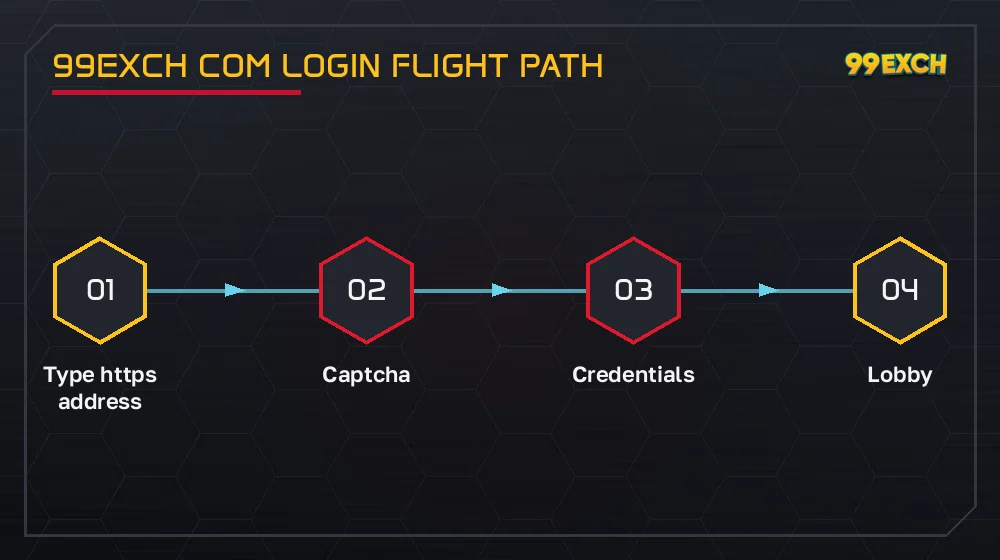
Schematic of the sign-in path from typed https address through captcha and credentials to the lobby, with fault branches
Each branch off the main line is one row of the fault table, with its repair.

99exch com login Questions — Quick, Secure Answers

My 99exch com login fails every time — which quick check comes first?

Check the top bar first: in most failed attempts the words went to a search engine and the 99Exch screen never opened. Next comes the https prefix, then old site data. Only when the domain refuses to load at all on your connection should you move to a mirror, since that row means a block.

Should I type https or http for a secure 99exch com login?

Type https. That prefix encrypts the connection, so your 99Exch username and password do not cross the network as readable text. A bare http request may get forwarded to https or may simply fail, depending on the address and your network, so writing https yourself removes the guesswork.

Captcha picture stays blank on the 99Exch screen — is there a fast fix before I write to the desk?

Yes: reload once, then allow images for that address by pausing data saver, lite mode or an ad blocker, which are the usual reasons the picture stays empty. A captcha that loads but keeps bouncing correct entries points at cookies instead. If nothing draws on any network, open the same 99Exch ID on another mirror.

The 99Exch spinner never stops after I press login — what is the safe repair order?

Shut all 99Exch tabs, wipe stored data for that one address, then sign in again on a steady connection. If it hangs again, flip between Wi-Fi and mobile data; hanging on both suggests a blocked domain, so try the same ID on a mirror. Only after those three steps is it worth messaging the desk.

My network will not open 99exch.com at all — where does the official 99exch com login move to?

It moves to a mirror domain, and your username, password and balance come along unchanged. In our test on 12 Oct 2026, .red, .green, .win and .live each opened the same 99Exch sign-in screen as .com did. Keep two of them bookmarked; if both fail, ask on +91 81097 11726 for a current one.