
99Exch Login — Complete the Official Cockpit Drill and Boot the Sportsbook Quick
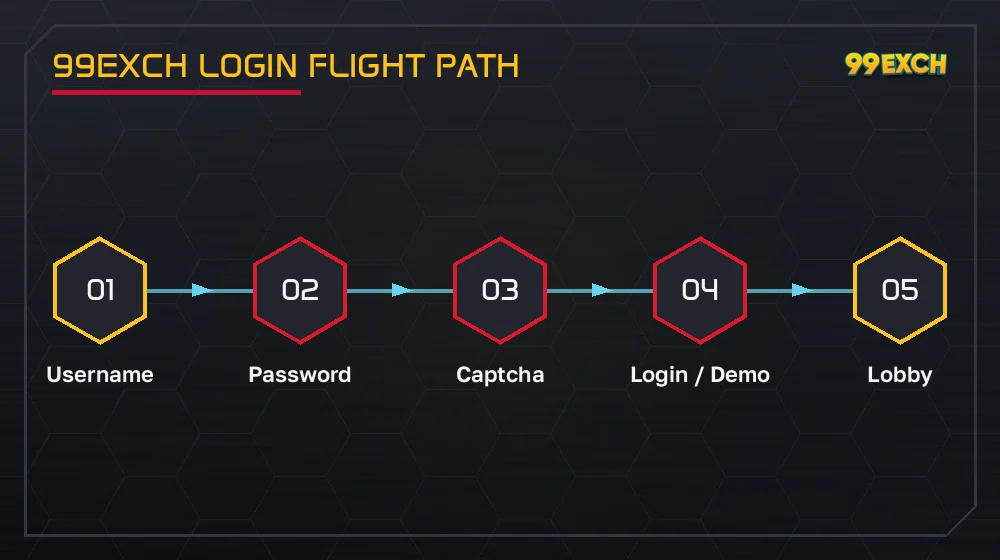
The 99Exch login asks for three things on the portal form: your username, your password and a captcha, after which the sportsbook opens. Below, each box gets its own short drill, the Login and Login with Demo ID buttons are told apart, and the screen you land on after signing in is laid out piece by piece.

99Exch Login Cockpit — Official Sign-In, Demo Optional
Clear the 99Exch captcha and enter the lobbyA mock only: nothing typed here is sent anywhere. The real 99Exch sign-in opens on the portal. WhatsApp desk +91 81097 11726 · 18+ only.
99Exch Login in Three Quick Moves
- Slot one takes the 99Exch username, pasted rather than typed, with every capital left where the desk put it.
- Slot two takes the password; on day one that is the string from the chat, from then on the replacement you picked.
- Clear the captcha last, press Login, and the 99Exch sportsbook boots.
That is the whole 99Exch login on paper. Three boxes, one button. In practice the first attempt is where people trip, usually because the username was retyped from memory instead of copied out of the chat, and a single swapped letter or a stray capital is enough for the portal to turn the pair down without much of a hint about which half caused it.
None of this happens on the page you are reading, by the way. The card near the top is a mock with locked boxes; every sign-in link here opens the portal at 99exchlogin.com.in, where the real form and its captcha live. If you got here after typing an address into a search bar and landing somewhere odd, the address problems have their own home on the 99Exch com login fix page. This one sticks to the boxes.
Quick once the details sit in front of you.
Your first 99Exch login — a quick worked run
Day one, tap by tap. Chat open, username long-pressed and copied, portal opened from the card link on this page, slot one filled by a paste. Back to the chat for the day-one password, into slot two. Captcha. Login. And the first thing to do once inside the 99Exch lobby is the password change in the menu, before the cricket tab gets your attention.
Every 99Exch login after that — the fast repeat
From the second visit on, the chat is only needed for the username, and many people simply remember it. The password is the one you set, the captcha is still there, and the Login button does the same job. Nothing else changes between the first sign-in and the hundredth, which is rather the point.
99Exch Login Fields, One Box at a Time — Clear Entries
Each box on the 99Exch login form wants something specific. Get one wrong and the form asks again, so it pays to know what each slot expects before you start pressing keys.
- Username
- Slot one. It is case-sensitive in practice, so a 99Exch name issued with a capital in the middle needs that capital here too. After pasting, put the cursor at the far end of the box; an invisible space hitching a ride from the chat is a common reason for a refusal.
- Password
- On the first visit, the temporary password from that same chat. After you change it, your own. The box hides each character, which is why long passwords go wrong more often than short ones; type slowly.
- Captcha
- The check that comes after the password on the real form. Fill it last. If a character is hard to read, get a fresh one rather than guess.
- Login
- Sends your username, password and captcha together. Press it only once the captcha is filled; tapping twice while the page loads gains nothing.
- Login with Demo ID
- Skips the first two boxes and opens a practice balance. Section 03 covers when to use it.
Treat the password swap as drill item zero, done inside the very first 99Exch session from the menu, because a string that anyone scrolling your WhatsApp could read is a weak lock on a real balance; picking a replacement is spelled out in the 99Exch password reset notes.
Small habit, big saving. Keep the 99Exch chat pinned so the username is always one scroll away.
A word on typing versus pasting, because it decides most first attempts. Phones like to capitalise the first letter of anything typed into a box, and some keyboards add a space after a word they think they recognised, so a username typed by hand can arrive at the 99Exch form slightly different from the one the desk created. Pasting avoids both. For the password, typing is fine as long as you watch the keyboard rather than the screen.
Two Buttons Under the 99Exch Login Slots — Real Balance or Free Practice
Login — your real 99Exch balance behind a secure entry
Uses the username and password of your 99Exch ID. Whatever balance sits on that ID appears once you are in, and the markets you open are the real ones, with prices showing only after sign-in.
This is the button for anyone who already holds an ID.
Login with Demo ID — a free 99Exch practice run
- No username or password needed
- No deposit
- A practice balance to click around with
- No real payout from anything won there
Which button to press depends on what you hold. Have an ID? Login. No ID yet, and you would like a look around the 99Exch lobby before messaging the desk for details? The demo button is the short way in, and since it runs on a practice balance there is nothing to lose while you find out where cricket, the live tables and the crash games sit (a demo win is a number on a screen, nothing more).
People do mix the two up in one particular way. The demo button is not a workaround for a forgotten password; if your real 99Exch login fails, demo opens a separate practice session with none of your own balance in it, so the real ID still needs sorting.
Two buttons. Two jobs.
Moving from demo to a real ID later is simple enough. Sign out of the practice session from the menu, go back to the 99Exch login form, and this time fill the username and password boxes before pressing the ordinary Login button. The practice balance stays behind in demo; it never transfers.
After the 99Exch Login: Real Lobby, Balance Line and Menu
Once the 99Exch login goes through, the form gives way to the lobby. Here is the readout of what that screen holds, roughly in the order most people look at it.
- Balance line
- The balance on the ID you just used. On a demo session it shows the practice figure instead.
- Menu
- Where the day-one password swap happens, next to the 99Exch statement. Money requests are a separate subject, explained on My 99 Exchange.
- Cricket
- Where most people head first after the drill. During the IPL season the match markets live here, exchange and fixed-odds side by side.
- Other sports
- Football, tennis, kabaddi and horse racing.
- Live casino
- Teen patti, andar bahar, roulette, blackjack, dragon tiger, baccarat, sic bo and game shows.
- Crash and instant
- Aviator, mines, dice, plinko and colour prediction.
Check the right 99Exch ID loaded — a quick first look
Look at the balance line before opening anything, and on a first visit also make sure the 99Exch menu offers the password change you are about to use. If you have more than one 99Exch ID, this is where you notice you signed in with the wrong one, and it is far better to notice it here then three markets later.
Real prices appear only after the 99Exch login
Market prices stay closed until you sign in. That is also why nothing on these 99Exch pages lists odds or scores.
Same trusted 99Exch lobby on browser, app or mirror
Whichever door you use, the browser tab, the Android build or a mirror address when your usual one is blocked, the balance line after sign-in reads the same figure, because the ID behind it does not change.

If the lobby looks different from what a friend described, check whether one of you came in through the demo button, because a practice session and a real 99Exch session carry different balances even though the game families sit in the same places. Same layout. Different money.
Where you go next depends on why you signed in. In-play cricket and the dealer tables are explained on the 99Exch live page, while back, lay and the 1 X 2 columns get their own breakdown on Play 99 Exchange. The lobby itself is the same either way, whatever you came for.
Players also search
99Exch Login and 99Exch ID Login — Clear Search Notes
Where the 99exch login sits on this page
Searchers typing 99exch login are after one thing: the form. Every button on this page therefore points to the portal, and the words go on the slots themselves (username from the chat, the password that replaced the temporary one, the captcha that comes last) plus the Login button that boots the sportsbook. Section 04 then describes the 99Exch lobby behind it.
Which box takes what during a 99Exch sign-in
| Box | What goes in |
|---|---|
| Username | Copied from the 99Exch chat |
| Password | Temporary, then your own |
| Captcha | Filled last |
| Demo button | Nothing, practice balance only |
How a 99exch id login differs from opening an ID
Adding ID to a 99exch login search usually means the person already holds a pair and wants to use it, so three stages keep the two jobs apart:
- getting the pair is a desk job, done in chat before you ever see this form
- using the pair is the three-slot drill in section 01
- keeping it yours means swapping the day-one password from the menu
When the 99Exch login form refuses you on this route
Check the the address first, then the pasted username, then whether you are using the newest password. Captcha trouble and stuck loading screens are covered on the 99Exch com login page, and the WhatsApp desk on +91 81097 11726 handles resets.
99Exch ID Login — Where a Genuine ID Comes From
A 99exch id login needs the ID first, and that ID does not come out of the login form. There is no register box under the password. New IDs are issued through the WhatsApp support desk, which sends the username and a temporary password into the chat; the full route, including what to send in that first message, sits with the 99 Exchange sign up walkthrough for WhatsApp.
So the order is fixed. Desk first, then the 99Exch login, then the password change. If you are still not sure what an ID actually covers (the short version: one username and password for the whole lobby, cricket to crash games), the 99Exch ID explainer spells it out.
Typed as 99exch login — the fast short form
The joined spelling most people use in a search bar. It leads to exactly the same 99Exch form desribed above, with the same three boxes and the same captcha at the end.
Typed as 99 exchange login — same official form
The full-form name gets its own write-up because many searchers also want the browser and the Android app compared side by side; that comparison lives on the 99 Exchange login page, not here.
Three spellings, one cockpit. A search for 99exch, 99 exch or 99 Exchange all end at the drill described in section 01, and the 99Exch details you paste into slot one do not care which spelling brought you there. Only the slots matter.
Some players never see a search result at all. They tap a saved shortcut ending in m/login or m/home, and what opens is the same 99Exch form shaped for a phone, with the same three slots. Why those shortcuts exist, and how to keep one pointing somewhere that works, belongs to the 99exch com m home phone shortcut notes.
99Exch Login Not Working? Three Fast Checks First
Run these three before messaging anyone. A refused 99Exch login very often comes down to one of them, and each takes seconds.
Is the official 99Exch address open?
Use the sign-in links on this page, which go to the portal. A look-alike result can be something else entirely: when tested on 12 Oct 2026, 99exch.in redirected to a third-party ID-provider information site, not the login form. If the address you trust is blocked by your internet provider, the mirror addresses carry the same ID and balance.
Was the 99Exch username pasted, not retyped?
Hold the box up against the chat, character by character, front and back. Phone keyboards like to capitalise a first letter on their own, and that one change is enough to make a 99Exch username a different username.
Are you using the latest 99Exch password?
The chat keeps showing the day-one password long after it has been retired. Copy it out of habit in your second week and the form will, quite rightly, say no; the 99Exch password that counts is whichever one you set last.
All three fine and still refused? Then the problem is probably further along, in the captcha, the browser's stored data or a page that keeps loading, and those fixes are listed with the 99exch com login error checklist so they are not repeated here. If even that does not clear it, the 99Exch WhatsApp desk on +91 81097 11726 can reset the password, which sends you back to step one with fresh details. Annoying. But quick.
What to send the 99Exch support desk
- Your 99Exch username, copied from the original chat
- Which address you tried to sign in on
- Whether the form refused the details or the page never loaded
What never goes into the chat — a safe rule
Your current password. The desk resets it and sends a fresh temporary one; it does not need the old one to do that, so there is no reason to type it into any message, to the 99Exch desk or to anyone claiming to be them.
Safe Sign-Out After a 99Exch Login on Shared Phones
Sign out from the 99Exch menu — the secure way
Open the menu after your session and choose the logout option. Closing the tab may not end the session on that browser, so the next person to open the same address could land straight in your lobby.
Shared phone, one trusted 99Exch ID
A cousin's handset used for one evening of IPL is the typical case. Finish with the logout, then open the browser's saved-sign-in list and wipe the 99Exch entry if it got stored. On your own phone, keep or drop it as you like.
Two handsets, one 99Exch ID: the browser and the Android build both accept it, and we know of no published cap on parallel sessions, so none is invented here. What we can say is narrower. Every phone you leave signed in is a lobby someone else could open with a tap, so end each drill with a logout on any screen that leaves your pocket. Hard to say more than that.
On the Android app the idea is identical, only the screen is smaller. The 99Exch menu holds the logout option there too, and the tidy habit is to treat every place you logged in, app or browser, as needing its own sign-out rather than assuming one covers the other. Fiddly? A little. It takes two taps per phone.
99Exch Login Questions — Trusted Answers
How do I log in to 99Exch?
Not on this page: the card here is a locked mock. Tap any sign-in link and the 99Exch portal opens in a new tab with the real form, where the slot order is username, password, captcha, then Login. If it refuses you, section 06 lists the three checks worth running before you message the desk.
What is the 99Exch ID login?
The 99Exch ID login is simply the three-slot drill on this page performed with details you already own. Searchers add the word ID because the pair came from a chat rather than a sign-up form. No pair yet? Ask the desk first; the form cannot issue one, it only checks them.
Can I use the 99Exch login without an ID?
Partly. The form carries a second button, Login with Demo ID, and pressing it skips slots one and two entirely. What loads is the 99Exch lobby with a practice figure on the balance line, handy for spotting where the IPL markets and casino tables sit. Real stakes and payouts still need the pair from the desk.
What do I see right after the 99Exch login?
You see the lobby: a balance line for the ID you used, the account menu, the cricket book with IPL markets in season, other sports, live casino tables and crash games such as aviator. Market prices show only after you are signed in, never before.
Why does the 99Exch login ask for a captcha?
The captcha is a check that protects the real 99Exch login form, and it is filled after the password, just before you press Login. If a character is unclear, get a fresh captcha rather than guessing. Repeated captcha trouble is covered on the 99Exch com login page.
Can I log in to 99Exch on two phones?
Yes, the same 99Exch ID works on the browser and on the Android app, so a second phone is fine. No session limit is published, so none is claimed here. If one of those phones belongs to someone else, sign out from the menu when you finish.
How do I log out of 99Exch safely?
Use the logout entry in the 99Exch menu, the reverse of the drill above. A closed tab is not a logout and may leave the lobby open for whoever picks the phone up next. Borrowed handset? Also delete any saved sign-in the browser stored before you give it back.