99exch App — Run Cricket Bets From the Official Android Console in Your Pocket

Want to bet on cricket from your phone without hunting for an address each time? Tap the 99exch app icon, sign in with the 99Exch username you already have, and the full lobby opens edge to edge: match markets, live tables, crash rounds, your wallet. Android gets the installed build; on an iPhone a Safari shortcut does the same job.

Woman in a crimson and gold exosuit holding one phone toward the camera beside a headline about the 99Exch pocket console

99Exch App Wrist Console — Sign In From Your Phone

Start the 99Exch phone lobby with your existing ID

Mock-up only: these boxes are readonly and send nothing. The real 99Exch sign-in, with its captcha, opens on the portal. Locked out on the phone? Message +91 81097 11726. 18+.

What the Official 99exch App Really Is on an Android Phone

Strip away the icon and the 99exch app is the same 99Exch lobby you reach in Chrome, wrapped in an Android shell so it opens full screen without an address bar. Nothing new lives inside it. The cricket book, the in-play markets, the casino rooms and the wallet screens are the ones the portal already serves; the app simply gives them a permanent spot on your phone, one tap away, which matters more than it sounds once a match is running and you would rather not type an address at the fall of a wicket.

No second registration either. A lot of people expect the 99 exchange app to want its own sign-up form; it never asks. Whatever 99Exch username the WhatsApp chat gave you is the one the icon accepts, and the wallet figure on the phone moves in step with the one on any laptop you sign into.

One more thing before the tour. The app is Android only (an iPhone route exists, covered further down, and it is closer to the real thing then most people expect).

Who gets the most from it? Players who check the 99Exch cricket book several times a match, mostly on a phone, mostly on mobile data. Someone who logs in once a week from a laptop gains very little from the app and can happily stay on the browser.

What the app does not change is just as useful to know. Markets, prices, game rules and the WhatsApp support route are the 99Exch ones, identical to the browser. A bet placed in the app shows up in the history you see on a laptop later. So the choice between them is about convenience on the phone, nothing else, since the account behind both is one and the same.

CHECKPOINT

Still need the file? The 99exch app download, the install-from-this-source prompt and updating over an older build are all on the 99Exch APK install page. This page starts after the icon is already on your home screen.

Inside the 99exch App: A Clear Map From Icon to Bet Slip

Here is the cockpit as most players meet it, front to back. Exact placement can shift a little when the 99Exch portal refreshes its layout, so read the rows below as where things usually sit rather than a fixed blueprint.

Home icon
Opens straight into the 99Exch sign-in screen. No browser chrome, no address to remember, no search results to dig through.
Sign-in
Username, password and the captcha check. First time in with a temporary password from the WhatsApp chat? Change it right after this screen.
Menu
Sports on one side (cricket, football, tennis, kabaddi, horse racing), casino and instant games on the other. During IPL season the cricket list is the busy one.
In-play
Whatever is running at this minute. Exchange prices and sportsbook prices stay hidden until you have signed in, then fill in as the match moves.
Bet slip
Tap a price and it lands here. On a match-odds market the 1, X and 2 columns mean home, draw and away.
Wallet
Balance and history. Deposits and withdrawals run on UPI or bank transfer, with help from the 99Exch WhatsApp desk.

Fast 99Exch Thumb Check Before You Confirm

On a narrow phone the two price columns of a 99Exch market sit almost touching, and a thumb lands wide more often than you think. Glance at the slip header before confirming. It names the side you picked. Takes a second.

Verified 99Exch Wallet Requests by Chat

The 99Exch app shows your balance, but money questions go through the WhatsApp desk on +91 81097 11726. This page gives no limits or timings because none are published, and we would rather say nothing than guess.

Free 99Exch Demo ID on the Same App

Nervous about tapping the wrong column with real stakes? Ask the desk for a 99Exch Demo ID, sign it into this same app icon and rehearse a few slips on the practice balance. It pays nothing out and needs no deposit, which is the point.

A worked example makes the map easier to follow. Say your ID details arrived in the WhatsApp chat this morning: a username and a temporary password. You tap the 99Exch icon, type both, solve the captcha and land on the lobby. First job, before anything else, is changing that temporary password, because the one in the chat is visible to anyone who sees your phone. Then open the menu, choose cricket, pick the match you care about and tap a back price; the bet slip slides in with the stake box empty. Type a stake, check the side once more, confirm.

That is the whole loop. Icon, sign-in, menu, market, slip. Every later 99Exch app session repeats it minus the password change, which is why players who bet during matches tend to keep the app rather than retypng an address each time.

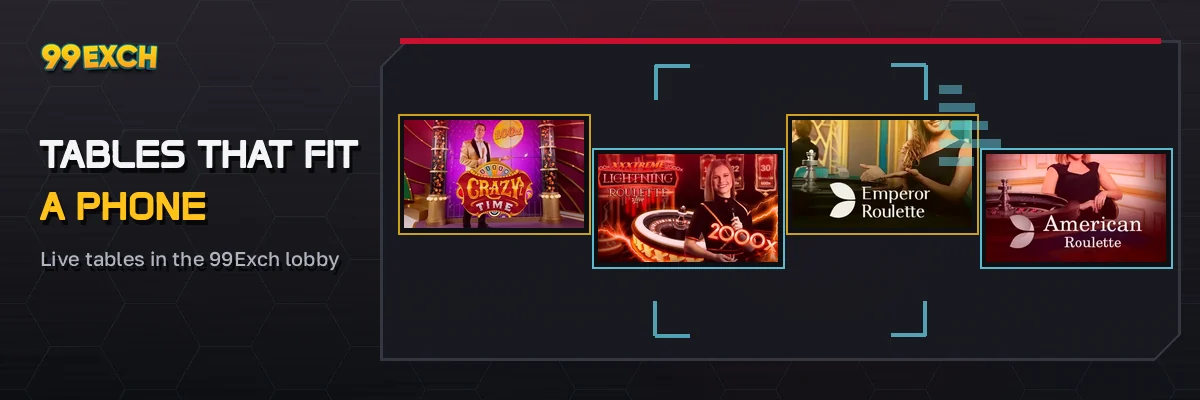
Tables that fit a phone strip racking Crazy Time Show, Xxxtreme Lightning Roulette, Emperor Roulette and American Roulette tables from the 99Exch live lobby
Cricket book, in-play board and live roulette rooms all open from the one 99Exch phone icon.

For the live side specifically, meaning what counts as in-play and which dealer rooms run around the clock, the 99Exch live markets page goes deeper than this tour does.

Live 99Exch App Tables That Suit a Phone Screen Best

Not every game feels the same at six inches. Wheel and game-show tables translate well to a portrait phone because the action happens in one place and the betting grid folds neatly under the video; card tables with lots of side bets get cramped. These four are live casino tables in the 99Exch lobby that players tend to keep open in the app between overs.

SYSTEM NOTE

Each tile here hands you to the 99Exch portal sign-in, not straight into the table. Log in first, then pick the room from the casino side of the 99Exch app menu. Video tables pull more data than the cricket board does, so on a weak signal the stream may stutter while the bet slip itself still works.

Cricket itself behaves best of all on the small screen, probably better than the casino side. The match list, the back and lay columns and the bet slip are light text rather than video, so the 99Exch app keeps them responsive even when a dealer stream would buffer. If you mostly bet on IPL overs and only drop into roulette at the innings break, that split is roughly how the app likes to be used.

The instant games sit on that same casino side of the 99Exch menu: aviator, mines, dice, plinko and colour prediction. Rounds are short and the screens are simple, so they load fast in the app. They also end quickly, which is exactly why it pays to set your own stop point before opening one.

99Exch App for iPhone: Easy Safari Add to Home Screen Steps

There is no 99Exch build for iOS, and the Android file will not install on an iPhone. What iPhone owners can do is pin the 99Exch portal to the home screen through Safari, which gives an icon that opens the lobby in a near full-screen window. Same ID, same balance. Close enough.

  1. Open Safari (it has to be Safari for this; other iPhone browsers handle the shortcut differently) and load the 99Exch portal from the official link.
  2. Wait for the 99Exch sign-in screen to finish loading, so the shortcut points at the right page.
  3. Tap the Share icon in the Safari toolbar.
  4. Scroll the share sheet and choose Add to Home Screen.
  5. Rename the shortcut if you like, for example 99Exch, then tap Add.
  6. Test it once right now, before a match: tap the fresh 99Exch icon, type your username and password, and confirm the lobby loads.
CHECKPOINT

Shortcut suddenly showing an error page? Your 99Exch account has not gone anywhere; the address stored inside the icon has probably been blocked by the network. Remove that icon, open whichever 99Exch mirror currently loads in Safari, and pin again. Your ID and balance carry across to every working address.

How does the Safari shortcut compare with the Android 99Exch app? It is a pinned web page, so it never needs updating and it always shows whatever the portal currently serves. The trade-off is that it remembers one address only. The Android build has its address set inside it; the shortcut has whatever you had open when you pinned it, which is why the address you pin matters.

Cannot see Add to Home Screen in the share sheet? Scroll further down the list of actions; on some iPhones it sits below the fold. And if the option still refuses to appear, check that the page is open in Safari itself and not inside another app's built-in viewer, which is a common catch when the 99Exch link was opened from a chat.

Android users who prefer not to install anything can do much the same thing in Chrome. The phone path of the portal, the m/home and m/login addresses people keep as bookmarks, is laid out on the 99exch com m home mobile page.

99 Exchange App or Browser: Which Is the Better Fast Route?

Pick by situation, not by account. A match night on mobile data, an iPhone at a friend's place and a borrowed office laptop each call for a different route into 99Exch, and the grid below sorts them; whichever one you use, the 99 exchange app and the browser read from one 99Exch login and one wallet.

Where the 99Exch App Wins for Quick Bets

  • One icon, no typing, no search results.
  • Full-screen lobby, so the in-play board gets the whole display.
  • Harder to land on a lookalike site by mistyping, since the address is fixed inside the 99Exch build.

Where the Browser Stays the Safe 99Exch Fallback

  • Works on iPhone, Android, laptop, anything with a browser.
  • Nothing to install or update.
  • When one address is blocked, you can switch to a working 99Exch mirror in seconds.
  • Shared or work phones where installing files is not an option.
Point99Exch app (Android)Phone browser or Safari shortcut
Username and passwordSame 99Exch IDSame 99Exch ID
BalanceSame walletSame wallet
Getting itAPK from the official portalNothing to install
Blocked addressWait for a fixed build, or use the browser meanwhileOpen a working mirror straight away
UpdatesInstall a newer file when one is issuedAlways the current portal page
iPhoneNot availableSafari Add to Home Screen

In practice many players keep both. The app for match nights, the browser as backup. If a sign-in fails in one, trying the other is a quick way to tell whether the problem is your account or just the route you used. The 99 exchange login page walks the browser sign-in field by field for anyone switching over.

One habit to avoid: running the 99Exch app and the browser at the the same time on one phone. Two open sessions on one ID can push the older one out, and then it looks like the app is broken when it is only being polite. Close one, use the other.

99exch App Search Terms Matched to Trusted Pages

What the search for the 99exch app lands on here

Typing 99exch app into a search bar usually means the icon is already installed, or nearly, and the next question is what happens after you tap it. This page answers exactly that: the sign-in screen, the menu, the in-play board, the bet slip and the 99Exch wallet, all under the username you already hold. No second account is needed.

Why the 99 exchange app spelling points to the same build

Spelling the brand out as 99 exchange app brings you to this very page for a reason: there is one 99Exch Android build, and the long form is simply how part of India types the name. Steps, screens and sign-in here hold for both spellings.

Where a 99exch app download request is sent from this page

  1. Open the 99Exch APK install page from the checkpoint near the top.
  2. Take the file only from the official portal link, never from a forwarded file.
  3. Come back here once the 99Exch icon sits on your home screen.

How iPhone owners get a 99Exch icon without an app file

Safari lets you add the 99Exch portal to the home screen through Share and then Add to Home Screen. The six steps are listed in section four above, and the shortcut signs in with the same ID and balance as the Android build.

Players also search

99exch App Not Opening or Logging Out: Quick Reliable Checks

Most app trouble falls into a handful of patterns, and almost none of them mean the account is gone. Work through these in order, because the first two clear the majority of cases and the last one is the slowest. Then again, if you already know your password changed yesterday, skip straight to the second card.

99Exch Icon Opens a Blank or Endless Loading Screen

This is usually the address, not the app. When an Indian network blocks the domain the 99Exch build points to, the screen just hangs. Switch off Wi-Fi and try mobile data, or the other way round. If one network works and the other does not, it is a block, and the browser on a working 99Exch mirror will get you in today.

Wrong Password Error in the 99Exch App Only

Did you change the temporary password in the browser? The app wants the new one. Retype it slowly and watch the captcha, since a missed captcha character reads as a failed login on most phones. Still refused? The 99Exch WhatsApp desk can reset it.

Logged Out Again and Again on the Same 99Exch Phone

Signing in on a second device, or on the browser while the app is open, can end the older session. Pick one window at a time. An old build can also misbehave after the portal updates; reinstalling the latest file from the official 99exch apk source sorts that out without touching your balance.

99Exch Balance Looks Different in the App and Browser

Both read the same wallet, so a gap almost always means one screen has not refreshed. Pull down or reopen the 99Exch app and the numbers should match. If they still differ after a settled bet, send a screenshot of each to the WhatsApp desk.

SYSTEM NOTE

Nothing on this list needs a new 99Exch ID. Your account and balance sit on the portal, not on the phone, so uninstalling the app and installing it again loses nothing. Write to +91 81097 11726 if all four cards fail.

A message the desk can act on quickly has four parts: your 99Exch username (never the password), whether you were in the app or the browser, the screen you were stuck on, and a screenshot of the error. Anything less usually turns into a back-and-forth of questions. Anything more, such as your password or a payment PIN, should never be sent at all, by anyone, to anyone.

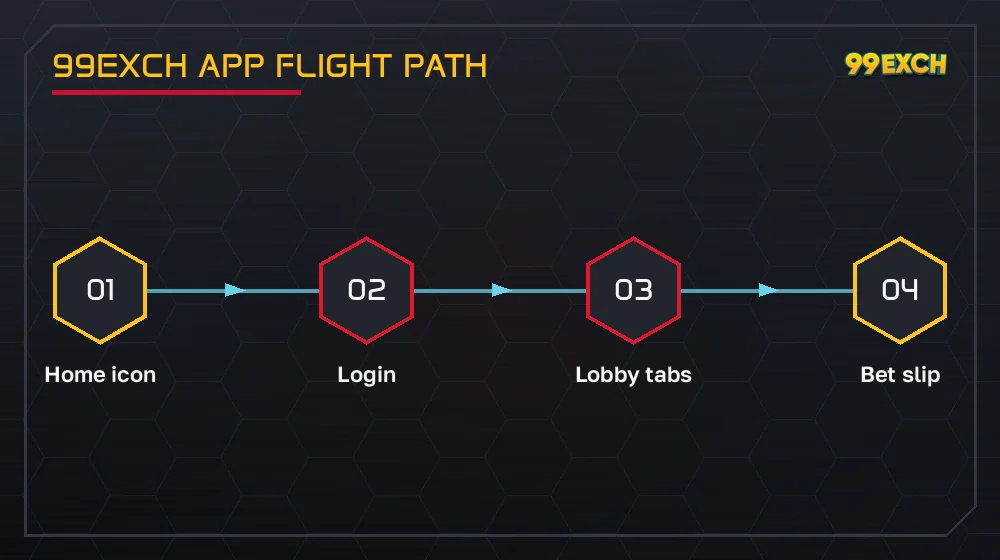
Schematic tracing the 99Exch phone route from home icon to login to lobby areas to the bet slip
Home icon, sign-in, lobby, bet slip: the four stops every 99Exch app session passes through.

99exch App Questions With Clear, Verified Answers

Is there an official 99exch app for Android?

Yes. Android phones can run the official 99exch app, though a Play Store search will not find it, because the build is handed out as an APK through the 99Exch portal link. After installing, tap the icon and sign in with your current username; cricket, casino rooms and crash games are all inside.

Can I use the 99exch app on an iPhone?

No iOS build exists, but iPhone users can get a working 99Exch icon. Open the portal in Safari, tap Share, choose Add to Home Screen and confirm. The shortcut opens the lobby almost full screen and accepts the same ID and password as the Android app and the browser.

Does the 99Exch app use the same ID as the browser?

Yes. Place a bet in the 99Exch app at eight in the evening, open a laptop browser at ten, and that bet is already in your history there, against the same balance. The portal holds the account, so the app is only another way in. A password you changed in one route applies to the others.

Why is my 99exch app not opening?

Most often the address inside the app is blocked by your network, so the 99Exch screen loads forever. Try mobile data instead of Wi-Fi, or log in through a working mirror in the browser. A wrong or outdated password and an old app build are the next likely causes.

Where is the safe 99 exchange app download link?

Take the 99 exchange app only from the official 99Exch portal link used across this site, never from a file someone forwards on chat or a third-party store. The step-by-step install, including the Android permission prompt and updating an older build, is covered on the 99Exch APK page.