
99exch Green — Fly the Trusted .green Corridor Past a Blocked Main Gate
Five letters after the dot are the whole difference between 99exch green and the address that just failed you. Late on 12 Oct 2026, 99exch.green served the same captcha-guarded 99Exch sign-in we found on the other live mirrors. Indian ISPs block betting domains routinely, but the account is not tied to any one address: one username, one balance, wherever it loads.

99Exch Green Corridor — Official Sign-In on .green
Log In to 99Exch on the Checked .green MirrorLocked preview: these two boxes accept nothing. The button above hands you to the 99Exch portal, where the real form and its captcha wait. Stuck on .green? Text +91 81097 11726. 18+.
99exch Green Route Check — Quick Steps to the Official Sign-In
Most readers reach this 99Exch page with one problem. The address they always used now shows an error, a blank tab or a notice from their internet provider. That is a block on the address, not a closed account, and the fix is a change of route rather than a new registration. Your 99Exch username, password and wallet are stored with the account itself, so they do not care which address you arrive from (the address is only the front door).
The 99exch.green address is one of the mirrors the 99Exch portal answers on, so the checklist below starts at the failed tab and finishes inside the lobby.
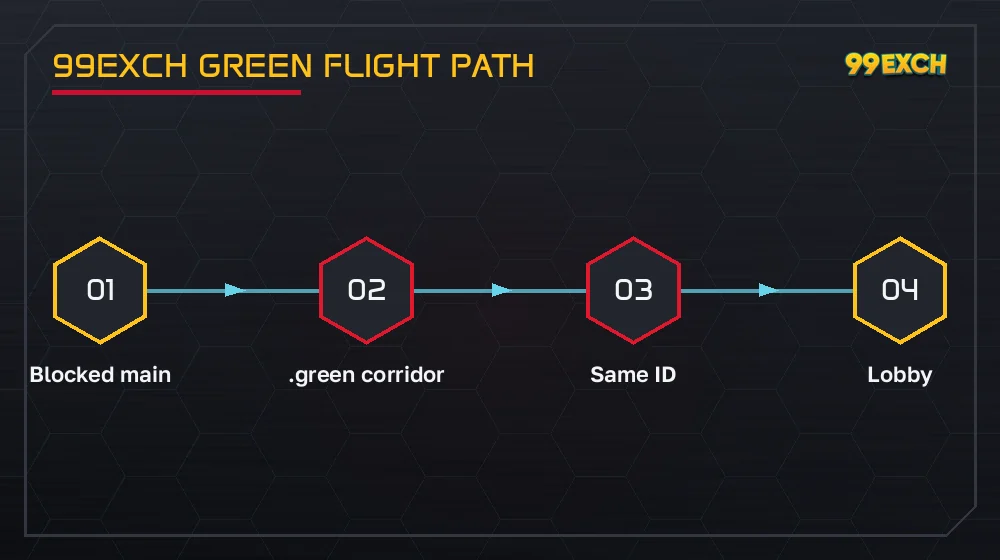
- Close the tab that failed. Reloading a blocked 99Exch address again and again rarely changes anything, because the provider gives the same answer every time.
- Key in 99exch.green by hand, letter for letter, with no search engine in between, so the request goes exactly where you meant it to.
- Wait for the 99Exch login screen with its username box, password box and captcha check before you type anything.
- Enter the username and password you already hold; the .green address issues nothing new and reads the same account record.
- Solve the captcha the portal shows, press sign in, and let the 99Exch lobby finish loading before you open any market.
- Before leaving the lobby, star the tab holding 99exch.green; on the next blocked evening that starred entry is your first try, ahead of any search.
A provider notice instead of the 99Exch login
Some connections replace the page with a short notice saying the site is unavailable under a government order. That message comes from your provider, not from 99Exch, and it means the address is filtered on that line. Go straight to step two.
Endless loading on a trusted 99Exch bookmark
A tab that spins and then times out often hides the same block, only quieter. Give it one honest wait. If nothing appears, treat it as blocked and type 99exch.green instead of reoading.
A secure-connection or not-found error
Browsers sometimes show a certificate warning or a cannot-be-reached screen when a provider interferes with the the lookup. Do not click through a certificate warning on a betting address; close it and use the .green mirror typed by hand.
Suppose 99exch.green also spins forever or shows a provider notice: treat that as the block catching up with .green, step down to the next address in the falback order printed near the end of this page, and if two or three of those stall as well, send the 99Exch WhatsApp desk on +91 81097 11726 a list of what you tried. Different door, same room.
99exch Green Status — Verified Result From 12 Oct 2026
Address pages go stale quickly, so here is the dated part. Our check on 99exch.green ran late on 12 Oct 2026, at 22:56 IST, using a desktop browser signature, and the address came back with the same 99Exch login screen that the other working mirrors served that night.
Every working mirror returned a page of exactly the same size, which is a decent sign that one 99Exch app sits behind several addresses. Not proof. A decent sign.
| Address | What loaded | Checked |
|---|---|---|
| 99exch.green | Same 99Exch login screen | 12 Oct 2026, 22:56 IST |
| 99exch.red | Same 99Exch login screen | 12 Oct 2026 |
| 99exch.win | Same 99Exch login screen | 12 Oct 2026 |
| 99exch.live | Same 99Exch login screen | 12 Oct 2026 |
| 99exch.com | Same 99Exch login screen | 12 Oct 2026 |
| 99exch.io | A not-found page | 12 Oct 2026 |
How the row was made, briefly: a request went to each address, and we recorded where it ended up, the page title that came back and the size of the page. 99exch.green ended on its own address with no redirect elsewhere, which is the part that matters most for a mirror.
What the date means for you is simple enough. If you are reading this a week or a month after 12 Oct 2026, the 99Exch row is a starting point, not a promise; run the short check below on your own connection, and if .green fails, the fallback list further down still applies in the same order.
- Open a private browser tab, so an old cached copy of a 99Exch page cannot fool you.
- Enter 99exch.green, then read the address bar once loading stops: a mirror that stays on .green passed the same test we ran, while one that jumps to another domain did not.
- Look for the 99Exch login screen with username, password and captcha, and nothing asking you to pay or register first.
- Close the private tab and repeat on your normal browser before signing in for real.
A result like this is a snapshot of the portal end of the line, and blocks roll out provider by provider, so 99exch.green could open on a home broadband line and fail on a mobile network during the very same evening without anything changing at 99Exch itself. Your own network decides the rest. Read the date before you trust the row.
What the verified .green check does show
- 99exch.green answered and stayed on its own address.
- The page was the same 99Exch login screen the other working mirrors served.
- Nothing extra was asked for before the login boxes.
What the 99Exch .green check cannot show
- Whether your own provider lets .green through today.
- How long the address stays unblocked.
- Anything about deposits, withdrawals or timings, which the test never touched.

99exch Green Keeps the Same Secure ID, Balance and Bets
A new address makes people nervous about their money, which is fair. So here is what moves with you when you sign in to 99Exch through .green, and what does not.
Short version first: everything tied to the account travels, and only the letters in the address bar change. The readout below goes item by item, roughly in the order players ask about them on the 99Exch desk, starting with the login details and ending with money movement.
- Username
- The one the 99Exch WhatsApp desk sent when your ID was created. It works on 99exch.green exactly as typed before.
- Password
- Unchanged by the move to .green. A player who never replaced the temporary one from the WhatsApp chat should do it on this visit.
- Balance
- The same figure. The wallet belongs to the 99Exch account, not to the address you used to reach it.
- Open bets
- Still listed under the account; a mirror only changes the road your browser takes to the server.
- Demo ID
- A practice balance stays a practice balance on .green, with no deposit and no real payout.
- Deposits and withdrawals
- Still requested through the 99Exch desk over UPI or a bank transfer; switching to .green does not reroute a single rupee.
The .green part is a suffix in the address bar, nothing more. 99Exch does not ship a green colour scheme, a green edition or a green wallet, and anyone telling you that a green account needs its own registration or its own deposit is describing something the 99Exch portal does not offer.
Suffixes like .green, .red, .win and .live are just the letters after the dot, sold by registries the same way .com is. The 99Exch lobby behind them stays one lobby: the cricket book with back and lay, the sportsbook, live casino tables such as teen patti and roulette, and crash rounds such as aviator. Same screens. Only the address changes.
A typical case from the 99Exch desk side: a player tops up through UPI on the main address on a Friday, finds it blocked on the Sunday before a match, and assumes the money is gone. It is not. Signing in on 99exch.green with the same username shows the same balance, because the money never sat on the address in the first place, and the bets placed on Friday sit in the same list. That is the whole trick.
- Read the balance at the top of the 99Exch lobby first and compare it with the last figure you remember.
- Open the bets list and find anything still running from before the block.
- If a deposit was sent while the old address was down, check whether it shows; if not, tell the desk the time and the UPI reference.
- Head to the cricket book, where IPL match markets sit in season, or to the casino tables, exactly as you would on the old address.
Players also search
Where 99exch Green Fits — Trusted Address Notes for This Page
How this page reads the 99exch green search, in clear terms
Someone typing 99exch green into a search bar usually wants one thing: a way back into the 99Exch account after the usual address stopped loading. This page treats the phrase as the 99exch.green address and nothing more, so every answer here is about reaching the same 99Exch sign-in, not about a colour, a theme or a fresh account.
The route steps, the dated check and the same-ID notes above all answer that single question, and the fallback gates below cover the evening when .green is blocked as well.
The verified 99exch green check, kept short for quick reading
One test, one date. The 99exch green row below is the same one shown in the larger table earlier, cut down to the three facts a returning player actually needs:
| Item | Recorded |
|---|---|
| Address | 99exch.green |
| Result | Same 99Exch login screen |
| Date | 12 Oct 2026, 22:56 IST |
Typing 99exch green into a phone browser bar the safe way
Typing the address beats tapping a forwarded link, because you know exactly where the request is going. On a phone, 99exch green should go in like this:
- the bare address 99exch.green, with no extra words around it
- your existing 99Exch username and password once the login screen shows
- a bookmark saved from inside the lobby, so the next visit skips the search
99exch Green on a Phone — Easy Bookmark or the Official App
Most 99Exch sign-ins happen on a phone, usually in the hour before a match, which is exactly when a blocked address hurts most. Saving 99exch.green properly once means the next block is a non-event; the three phone setups below cover the common cases, and the comparison after them weighs the address against the Android app.
Android browser: a quick 99exch green shortcut
Open 99exch.green in Chrome, sign in to 99Exch once, then use the browser menu to add the page to your home screen. The icon opens the .green address directly, which is handy on the night your old bookmark starts failing.
iPhone Safari: the easy 99Exch home-screen route
On an iPhone, Safari handles everything, because the 99Exch .apk is Android-only. Load 99exch.green, sign in once to confirm the lobby appears, then save it through Share and Add to Home Screen; the resulting icon simply reopens the .green address.
Old mobile bookmarks: a safe 99Exch path swap
The 99Exch portal uses /m/home and /m/login as its mobile paths, and plenty of players saved those on the main address. Keep the part after the slash and swap only the address before it; it should land on the same mobile screen, though we only tested the bare .green address.
Staying on the 99exch green address: easy and free
- Nothing to install, and it works on Android and iPhone alike.
- Your 99Exch login works here unchanged, and the wallet figure matches the one on .red or .com.
- Needs a new address if a provider blocks .green later.
Switching to the official 99Exch Android app
- The 99Exch build comes as an .apk from the portal itself; the Play Store does not list it.
- Android asks you to allow installs from that source the first time.
- Signs in with the same ID you use on 99exch.green.
Which one rides out a block better is hard to say from our side, because we tested addresses on 12 Oct 2026 and not the app's connection. The download steps, the install permission and what an update over an old build looks like all live on the 99Exch APK download page, so they are not repeated here. Pick one. Plenty of 99Exch players keep both, the app for daily use and 99exch.green saved in the browser for the day the app will not connect, and that habit costs nothing.
A home-screen tile for 99exch.green breaks the moment a provider adds .green to its block list, and the tile gives no warning beyond a page that never loads. Edit the tile rather than deleting it, or keep a second one for the next working 99Exch mirror. Two icons, no panic.
99exch Green Blocked Too? Fast Fallback Gates and Real Fixes
No single address is permanent, and .green will not be either. When it fails, the next stop is the 99exch red mirror, which loaded the same 99Exch screen on the same night, and after that the 99exch win login address.
The main address deserves its own check too. Its dated status, the 99exch xom typo people make on phone keyboards and the .io result are all on the main 99 Exchange com address check, and it is worth trying first if your provider has eased the block. A practical order, then: the address you already had, .green, .red, .win, and the main 99Exch address once more at the end. Trying them in a fixed order means you never lose track of which one failed, and the desk gets a cleaner report if every one of them stalls.
Sometimes the address is fine and the trouble is elsewhere. The three cases below are the ones that come up most on 99exch.green, each with what to do next.
The .green address loads but 99Exch sign-in fails
A refused login on 99exch.green almost never means the mirror is broken, since the same account sits behind every address. Usually it is a mistyped captcha or an old password the browser filled in by itself. Clear the autofill, type both again, and if the 99Exch form still refuses, ask the desk for a reset.
The page opens without the official 99Exch login
You are on a different site. Check the address bar letter by letter for 99exch.green, close the tab and type it again yourself. If a forwarded message gave you the link, ignore that message and rely on the typed 99Exch address instead.
Every 99Exch mirror fails on one connection
That points to the network rather than to the address, so switch between mobile data and home broadband once before writing to the desk, and mention which addresses you already tried so the 99Exch team does not suggest them again.
One more trap is worth a line. Lookalike spellings exist for almost every betting address, and a page that copies the 99Exch login screen can look convincing on a small phone. The tested address is 99exch.green, spelt exactly that way; anything with an extra letter, a hyphen or a different ending is not the mirror recorded on 12 Oct 2026, so close it rather than typing a password into it.
- Message +91 81097 11726 and lead with the 99Exch username, so the desk can look up the right account straight away; the password stays with you.
- List the addresses you already tried, for example .com, .green and .red, and say which connection you used.
- Say what you saw: a provider notice, a timeout, a certificate warning or a login refusal.
- Wait for the reply in the same chat and try the address the 99Exch desk names before anything else; keep this fallback order handy if that one stalls too.
99exch Green Questions — Clear Answers Before You Sign In
What is 99exch green, and is it an official address?
A spare address. 99exch.green belongs to the set of mirror domains the 99Exch login portal answers on, along with .red, .win, .live and .com, and it exists because Indian providers keep filtering betting domains. Sign in there with the username, password and balance you already have; nothing is issued fresh.
Is 99exch.green working right now?
Yes, as of the 12 Oct 2026 check. A request sent to 99exch.green at 22:56 IST that night stayed on the .green address and returned the 99Exch login page, identical in size to the .red and .win copies. Your own provider may still filter it later, and then the fallback order on this page takes over.
Can I use my same 99Exch ID on 99exch green?
Yes, the one you already own. On 99exch.green the 99Exch login screen takes the same username and password, and the account it opens shows the balance and running bets you left on the blocked address. No re-registration happens. Players still holding the temporary password from the WhatsApp chat should replace it during this visit.
Is 99exch green a different version of the site?
No. Green here is the .green domain suffix, not a version, theme or special edition. The lobby behind 99exch.green is the same 99Exch app that runs on the other working mirrors, with the same cricket book, sportsbook, live casino tables and crash games, all under one ID and one balance.
Is there a separate 99exch green app to download?
No separate green app exists. The 99Exch Android app is an .apk taken from the official portal, not from the Play Store, and it signs in with the same ID you use on 99exch.green. iPhone users stay on the browser and can add the .green address to the home screen instead.